Notices and Alerts are a way to post short, time sensitive announcements to your website
Step 1
Login to the to your Administrator Account of your esportsdesk.com website.
Step 2
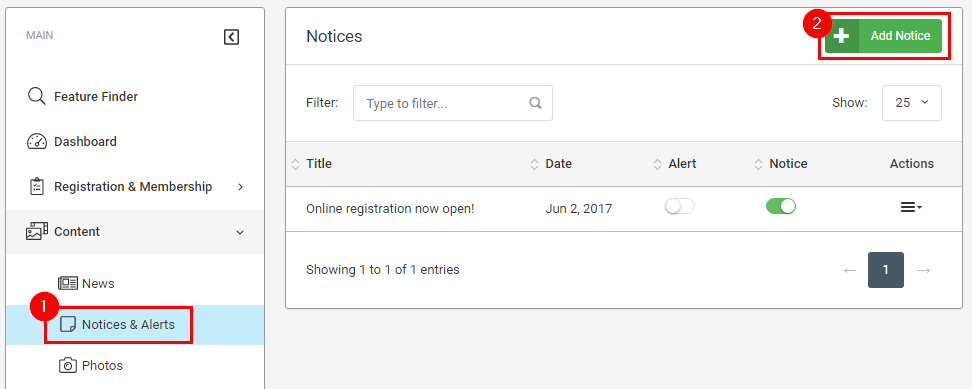
Select Notices & Alerts from the menu on the navigation menu and then click the green Add Notice button in the top-right
Step 3
Fill in the form fields and select which site(s) you'd like your Notice/Alert to display on
Setting the notice to Display as Alert will show your notice as a pop-up window, whereas the Display as Notice option will be shown on the Notice Board page on the sites you've selected.
Optionally, you can also set your notice/alert to automatically start displaying on a certain date and time, and be automatically taken down on a specified date and time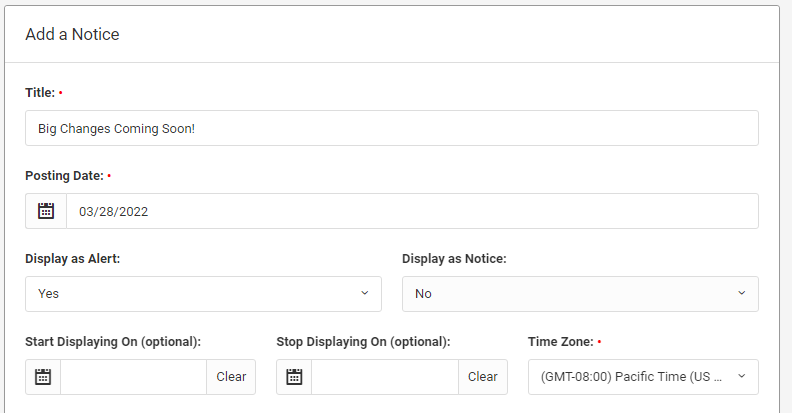
Click the blue Add New Notice button at the bottom of the form when you are done
Was this article helpful?
That’s Great!
Thank you for your feedback
Sorry! We couldn't be helpful
Thank you for your feedback
Feedback sent
We appreciate your effort and will try to fix the article