Your esportsdesk.com User Account will allow you to purchase and manage your various registrations, memberships, family members and calendars.
Step 1
Click Sign In under the Registrations box, or at the top of the Registrations page (as shown below). If you don't have an account yet, Create an esportsdesk.com User Account here.

Step 2
Log-in using your email address and password. Press Sign In to log-in.
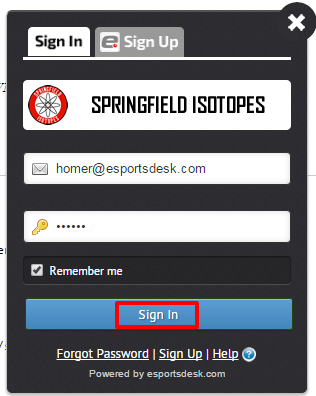
If you cannot remember your account password, please follow the steps here, to reset your password.
If you continue to have troubles, feel free to contact us at support@esportsdesk.com or 1-604-235-1987 (or toll free in North America at 1-800-323-6012)
Was this article helpful?
That’s Great!
Thank you for your feedback
Sorry! We couldn't be helpful
Thank you for your feedback
Feedback sent
We appreciate your effort and will try to fix the article