You can set which registration session is the default by following the below steps
Step 1
Login to your Administrator account
Step 2
Next click Sessions in the Registration & Membership section of your administrator navigation.
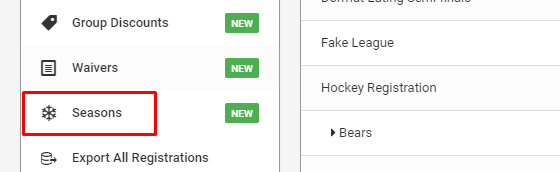
Step 3
Your current default session will be listed at the top. Drag and drop the arrow icon to move your desired session to the top of the list to make it the default. The page will automatically refresh and save your changes.

Was this article helpful?
That’s Great!
Thank you for your feedback
Sorry! We couldn't be helpful
Thank you for your feedback
Feedback sent
We appreciate your effort and will try to fix the article